How to generate Summary Data and Extended Data
EMu 10 includes the option to use Standards module definitions to generate the Summary Data and Extended Data in a module, or system-wide.
 Standards module record definitions out-of-the-box
Standards module record definitions for Summary Data and Extended Data for the base EMu modules (excluding the Catalogue) are supplied with EMu 10. These can be modified to suit each institution's specific requirements.
As the majority of EMu modules use the same Standards module definition to derive Extended Data, a special Default Extended Data record definition has been provided:
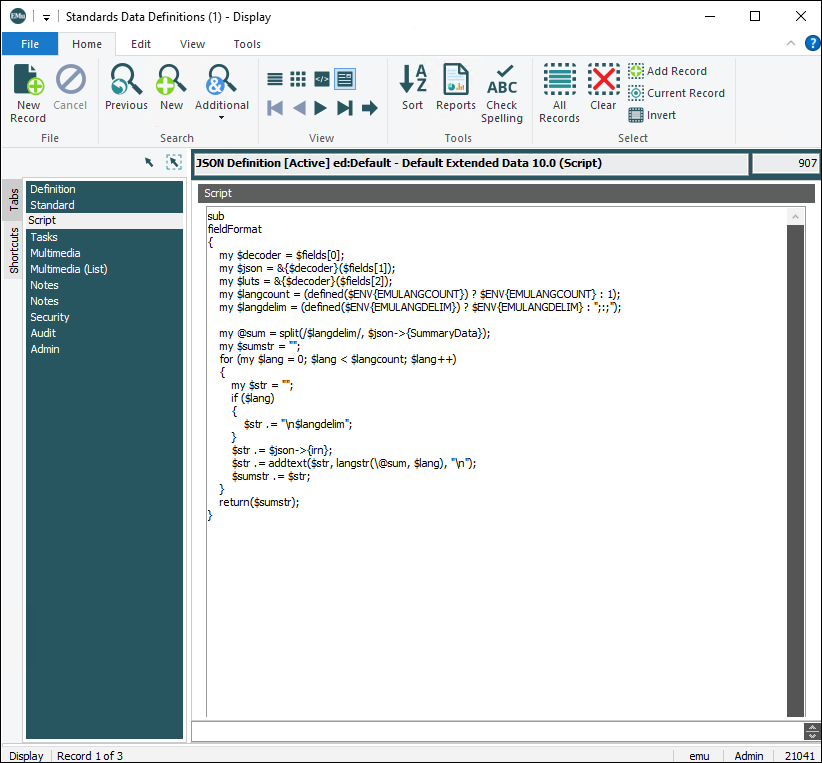
Standards module scripting
The process for defining Standards record is described in How to define a standard in EMu using a Format Specifier of type Script.
Here we describe how to define Standards records to generate the Summary Data and Extended Data for a module; it should be read in conjunction with How to define a standard in EMu.
Naming convention
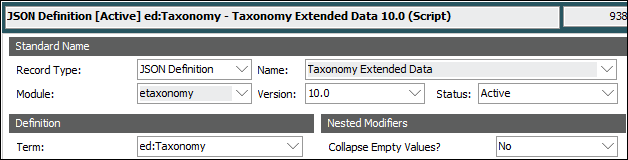
The following naming convention must be followed when adding a new definition for the Catalogue and for institution specific modules:
|
Field |
Details |
|---|---|
|
Name: (Standard Name) |
The definition name comprises the module name (Command Centre button name) followed by the definition type: Summary Data or Extended Data. The example above shows an Extended Data definition for the Taxonomy module: Taxonomy Extended Data |
|
Term: (Definition) |
The value in Term comprises an acronym and colon:
followed by the module name. As the example above is Extended Data for Taxonomy, we have:
|
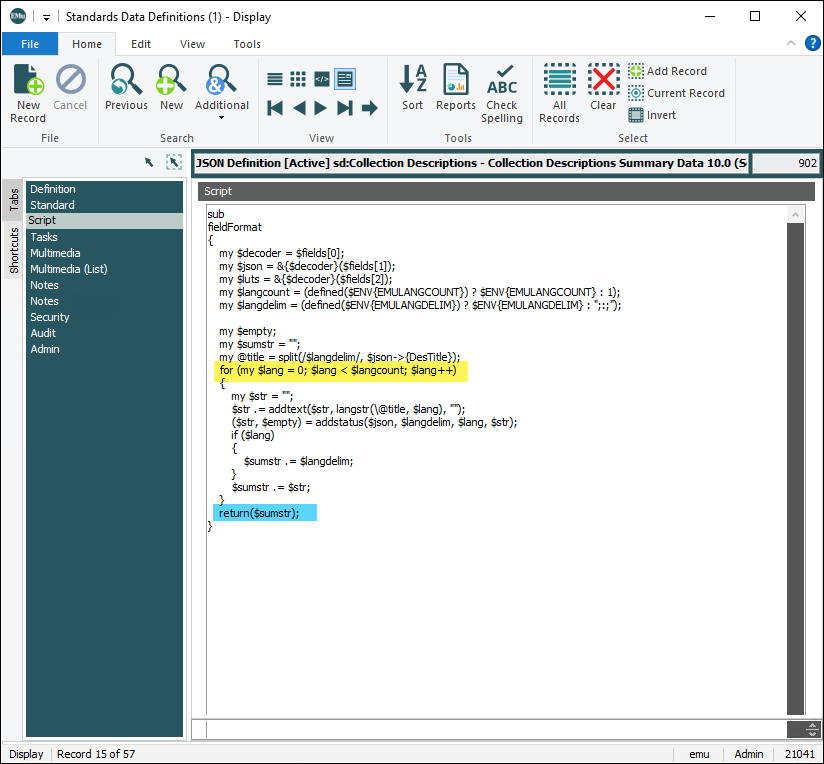
In all cases, string generation code should be placed within EMu’s standard structure for generating strings as shown below:
The script
sub
fieldFormat
{my $decoder = $fields[0];
my $json = &{$decoder}($fields[1]); my $luts = &{$decoder}($fields[2]); my $langcount = (defined($ENV{EMULANGCOUNT}) ? $ENV{EMULANGCOUNT} : 1); my $langdelim = (defined($ENV{EMULANGDELIM}) ? $ENV{EMULANGDELIM} : ";:;");my $emptystr;
my $sumstr = "";
for (my $lang = 0; $lang < $langcount; $lang++) {my $str = "";
($str, $emptystr) = addstatus($json, $langdelim, $lang, $str);
if ($lang)
{$sumstr .= $langdelim;
}
$sumstr .= $str;
}
return($sumstr);}
This structure caters for both single language and multi-language systems. The evaluation of the text for the generated string occurs within the for loop. The evaluated string is passed back to EMu through the return statement.
The fieldFormat function has access to the fields array, which contains information that can be used within the fieldFormat function. The fields array contains three rows (index is 0 based) of information. These are:
|
|
A decoder that decodes JSON (JavaScript Object Notation) strings. |
|
|
A JSON string that contains data elements. |
|
|
A JSON string that contains System Lookup List values. |
An example of a JSON string that contains the irn and SummaryData for a record might look like:
{“irn”:12345,
“SummaryData”:”This is the Summary Data of a record”
}
To access the individual elements (irn and SummaryData) of the JSON string, the JSON string needs to be decoded. This is done by the first two lines of the fieldFormat function:
my $decoder = $fields[0];
my $json = &{$decoder}($fields[1]);
Line one accesses the decoder from the first row (0 based index) of the fields array.
Line two uses the decoder to decode the JSON data string that is held in the second row of the fields array and places the output in the $json variable. Individual field (column) data can be accessed through the $json variable, e.g.:
$json->{irn} or $json->{SummaryData}
Line three uses the decoder to decode the JSON data string that is held in the third row of the fields array and places the output in the $luts variable. Individual System Lookup List data, e.g. System Yes, can be accessed through the variable, e.g.:
$luts->{Yes} or $luts->{No}
Note: When accessing System Lookup List data the name (with the word System removed) of the System Lookup List is used to get its value. For System Yes this is Yes, i.e.: $luts->{Yes}
The settings used by multiple language systems are handle by lines four and five:
my $langcount = (defined($ENV{EMULANGCOUNT}) ? $ENV{EMULANGCOUNT} : 1); my $langdelim = (defined($ENV{EMULANGDELIM}) ? $ENV{EMULANGDELIM} : ";:;");
Line four sets the language count and line five sets the language delimiter. The for loop uses these settings for generating the correct language strings for each language.
Predefined functions
A number of predefined functions are included to assist with the generation of the data strings:
addstatus
($str, $emptystr) = addstatus($json, $langdelim, $lang, $str);
The addstatus function takes four parameters:
|
|
the decoded JSON data string. |
|
|
the language delimiter string. |
|
|
the language number we are processing ( |
|
|
the generated string so far. |
It returns two values:
|
|
the updated generated string. |
|
|
an indication of whether the passed string ( |
The routine first looks at the passed $str and if it is empty, sets the return string to [irn: NN] where NN is the irn of the record. It then checks if the environment variable EMUDEFAULTSTATUS is set. If a value is in the SecRecordStatus column and either the environment variable EMUDEFAULTSTATUS is not set or the value does not match what is set for the environment variable EMUDEFAULTSTATUS, it adds this value to the front of $str, separating the two with a hyphen.
Where $str = "This is an informative string", EMUDEFAULTSTATUS is set to Active and SecRecordStatus is Active, the addstatus routine would return:
$str set to This is an informative string and $emptystr set to 0
Consider the same scenario where SecRecordStatus was set to Retired; in this case the routine would return:
$str set to Retired - This is an informative string and $emptystr set to 0
Finally, consider where $str = "", EMUDEFAULTSTATUS is set to Active and SecRecordStatus is Pending and the irn of the record is 43; in this case the addstatus routine would return:
$str set to Pending – [irn: 43] and $emptystr set to 1
langstr
my @missing = split(/$langdelim/, $json->{TraMissing});my $lmissing = langstr(\@missing, $lang);
The langstr function takes two parameters:
|
|
a reference to an array of language strings. |
|
|
the language number we are requesting ( |
It returns a single value:
|
|
the language string for the requested language. |
The routine takes an array of language strings and a language number and returns the language string for the requested language number. If a language string does not exist for the requested language number, it returns the first language string.
The array of language strings is obtained using the perl split function. This is shown in the first line of code above.
Consider the following JSON value $json->{Language} which is set to "English;:;French" with a language delimiter of ;:;.
Calling the perl split function would return an array of two rows: the first row would contain English and the second row French.
When $lang (0 based array) is 0, English will be returned, and when $lang is set to 1, French will be returned.
addtext
$str .= addtext($str, langstr(\@title, $lang), " ");
The addtext function takes three parameters:
|
|
the generated string so far. |
|
|
the language string for the requested language. |
|
|
a string to join the generated string and the language string if they both are not empty. |
It returns a single value:
|
|
the string to add to the currently generated string. |
The routine first looks at both $str and $langstr and if both are not empty, returns $langstr prefixed by $join; otherwise it returns $langstr.
Consider where $str = "Outgoing Loan", $langstr = "National Museum and $join = " – "; the addtext routine would return:
- National Museum
The generated string so far becomes:
Outgoing Loan – National Museum
formatdate
my $date = $json->{DatCompletionDate};$date = formatdate($date, $ENV{dateformat});
The formatdate function takes two parameters:
|
|
a date (JSON formats to |
|
|
the format that the output date should be in. |
It returns a single value:
|
|
the supplied date formatted to the specified format. |
Note: The fieldFormat processing sets an environment variable dateformat that reflects the date format being used by the EMu system. Access to this is through the perl $ENV hash and specifically as $ENV{dateformat}.
Where $date = "2025-08-25" and $format = "dd MMM yyyy", the formatdate routine would return:
25 Aug 2025
formattime
my $time = $json->{DatCompletionTime};$time = formattime($time, $ENV{timeformat});
The formattime function takes two parameters:
|
|
a time (JSON formats to |
|
|
the format that the output time should be in. |
It returns a single value:
|
|
the supplied time formatted to the specified format. |
Note: The fieldFormat processing sets an environment variable timeformat that reflects the time format being used by the EMu system. Access to this is through the perl $ENV hash and specifically as $ENV{timeformat}.
Where $time = "20:25:08.254" and $format = "hh:mm", the formattime routine would return:
20:25
formatlatlong
my $latlong = $json->{LatLatitude};$latlong = formatlatlong($latlong);
The formattime function takes one parameter:
|
|
a latitude or longitude (JSON formats to |
It returns a single value:
|
|
the supplied latitude or longitude formatted to |
Consider where $latlong = "20 25 08 N", the formatlatlong routine would return:
20 25 8 N